Showing posts with label Computers. Show all posts

Tuesday, September 10, 2013

HP Expands its Z Workstation Portfolio

While most people were waiting today for Apple to make official what most people already assumed was coming, I was patiently waiting to be able to write about some really cool new stuff that I learned about last week but couldn't write about until today.

Last week, I spent a day in the Big Apple at an HP press and analyst event at which the company unveiled a number of new workstations and display products, including the world's first workstation ultrabook, the HP ZBook 14.
The new HP ZBook 14

Unlike other ultrabook computers, the new HP ZBook 14 is a true mobile workstation complete with an AMD FirePro M4100 discrete graphics card with 1GB of dedicated GDDR5 memory. HP will be offering a choice of Intel Core i5 and Core i7 processors. One of the really cool features is that the system automatically switches from the integrated Intel HD Graphics 4400 to the more powerful AMD GPU when needed. Since it's an ultrabook, it comes with a 10-point multi-touch screen. But since it's also an HP workstation, it's ISV certified and comes with HP tools including HP Performance Advisor and HP Remote Graphics Software. It may just be the perfect portable for engineering professionals on the go.

The company also announced two other new mobile workstations, the HP ZBook 15 and ZBook 17. These mark the latest iteration of the company's mobile workstation line, with a name change to clearly identify them as members of the HP Z-workstation family (as opposed to the older EliteBook moniker). The new ZBook 15 will include an option for a super-high-resolution QDH+ 3200x1800 display. Both the 15 and 17 feature a Thunderbolt port as well as optional DreamColor Display panels.
The entire new HP ZBook mobile workstation family
The new ZBook mobile workstations feature 4th Generation Intel Haswell dual- and quad-core processors and next generation technologies from NVIDIA and AMD, including the newly announced Keplar-based professional graphics from NVIDIA. And all three ZBook mobile workstations feature innovative new tool-free chassis for easy upgrades and serviceability.

HP also unveiled updates to the Z420, Z620, and Z820 workstations to include the latest Intel Xeon E5-1600v2 and E5-2600v2 "Ivy Bridge" families of processors as well as memory running 16% faster and 2nd generation Thunderbolt ports for data transfer speeds 4 times faster than USB 3.0.

The new HP Z  workstation family and new Z27i and Z30i IPS displays
Lastly, HP added to its line of professional displays, announcing the new HP Z27i and Z30i displays, which incorporate IPS Gen 2 panels that deliver 100% of the Adobe RGB color space while offering power savings of up to 37% compared to HP's first generation IPS displays.

The HP ZBook 15 and 17 are already available, with the ZBook 14 scheduled to be released in October. The updated Z420, Z620, and Z820 workstations as well as the new displays will also become available in October. I hope to be able to review all of the new workstations and displays as soon as I can get my hands on them, so stay tuned.

Tuesday, April 16, 2013

File Tabs in AutoCAD 2014

One of the coolest new features in AutoCAD 2014 are the new File Tabs. Located across the drawing area (just below the ribbon), the new File Tabs provide a fast and visual way to switch between open drawings or to create new ones.


When you first start the program, you will see a file tab across the top of the drawing area. With just a single drawing open, you see just one file tab, which corresponds to that drawing. But as you open additional drawings, you will see additional file tabs, one for each open drawing.

File tabs are just one of the new features included in my new iBook, AutoCAD 2014 New Features and Enhancements – Revealed!, published by 4D Technologies/CADLearning. I've uploaded the entire lesson video on File Tabs to YouTube so that you can see for yourself how File Tabs can make it much easier to work in AutoCAD, particularly if you have multiple drawing files open.


If you have an iPad, you can actually download the entire iBook for FREE from the Apple iBookstore. That's right, 4D Technologies/CADLearning has decided to make my new iBook AutoCAD 2014 New Features and Enhancements – Revealed! free this year. So, grab your iPad, open up the iBooks app, and hop on over to the iBookstore. As of today, this is the only iBook available for AutoCAD 2014. So just search for "AutoCAD 2014".
 
Now that AutoCAD 2014 is shipping, I can finally update my blog with news, tips, and tricks about AutoCAD and some of the other new software from Autodesk (including the new Autodesk ReCap software). So check back.

Thursday, February 4, 2010

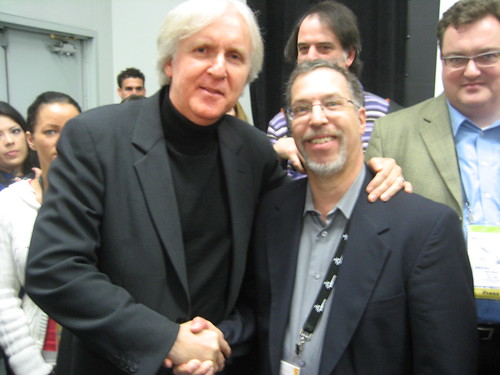
I Got to Meet James Cameron

I just returned from Anaheim, where I was covering the SolidWorks World conference, an event very similar to Autodesk University. I always enjoy attending this event and am grateful that the folks at SolidWorks invited me. The enthusiasm of the SolidWorks user community is amazing. Even with the slow economy, there were 5,000 people in attendance.

One of the high-points for me was a presentation on Tuesday morning by director James Cameron, this on the same morning that the Academy Award nominations were announced. After his keynote, Cameron met with members of the press and answered questions for more than 30 minutes. I was able to ask the second question, which elicited about a 5 minute response. Afterwards, Cameron met individually with most of the press in attendance, shook hands, posed for photos, and answered additional questions.

Needless to say, it was a real thrill.
Of course, I've also got things to report on the conference itself, but I'll save that for a subsequent posting.

Saturday, April 25, 2009

North American Eagle at COE

I just finished writing an article about Ed Shadle and the team at North American Eagle. NAE is building a vehicle that they hope will break the current land speed record held by the ThrustSSC. Rather than building a vehicle from the ground up, Ed's team has converted an F-104 Starfighter jet into a land-based vehicle that they hope will surpass the current record of 763mph set in 1997. If all goes according to plan, Shadle will attempt to reach 800mph on July 4, 2010.

The article will soon appear in Desktop Engineering magazine. But advance copies of the article were distributed on Wednesday in Seattle when three members of the NAE team—Ed Shadle, Keith Zanghi, and Steve Wallace—spoke at the COE conference.

IMG_4888

After their presentation, I spent some time with them in the AMD/ATI booth at the conference where Lenovo's newly launched ThinkStation S20, D20 were showcased along with the ThinkPad W500 running CATIA and the Eagle models. Also on display was a scale model of the Eagle and the front wheel that was designed on Lenovo ThinkStation using CATIA. Here I am on the right along with the NAE team and Zee Effendi from Lenovo.

figure-01

I'll let you know as soon as the article is available online. In the meantime, here's a photo of the North American Eagle vehicle taken last summer in the desert during one of the test runs.

Wednesday, December 17, 2008

New HP Mobile Workstation

As many of you know, I am a long-time contributing editor to Desktop Engineering magazine and several other publications. One of my regular subjects is reviewing the latest computers.

I have long been a fan of HP. Their workstations—both desktop and portable—have always been absolutely superb. My own personal computer is an HP Compaq 8510w mobile workstation, which happens to be the fifth or sixth in a series of HP notebook computers I have used over the years. I am extremely happy with my HP portable workstation and recommend it to others whenever the subject comes up in conversations as I travel the country.

So you can imagine how much I was looking forward to reviewing the latest system in the HP mobile workstation line: the EliteBook 8530w. My first impression is a bit more "mixed" than usual. The system itself is quite elegant—much more modern and streamlined than even my relatively new 8510w—but some of the design decisions compromise things I've loved in the older models.


The new HP EliteBook 8530w features an elegant new design.

For example, I've long applauded HP for putting little icons around the keyboard that clearly identify the various ports around the edges of the notebook, making it extremely easy to find the right port without having to tip the system up on its side. This simple touch, present on all the HP mobile workstations I've owned or reviewed in the past, are not present on the 8530w.


Unfortunately, the new design eliminates the handy icons, seen here on the older HP Compaq 8710w mobile workstation, that clearly identified each port located on the edge of the computer.

According to an HP rep I spoke with, these were eliminated in the new EliteBook because instead of the gray finish on all of the previous models, the new EliteBook uses HP's new DuraCase design, which features a brushed aluminum skin bonded to a magnesium alloy chassis. The attractive two-tone appearance meant that to include the little icons would have required two separate silk screening steps and wouldn't be in keeping with the new design. So it seems that appearance has trumped functionality. Too bad.

The evaluation unit I received came with Windows Vista Business edition. I still prefer Windows XP for production CAD work, but I've had no serious issues with Vista...at least not until now. My first problem involved user rights management. I found it nearly impossible to install and run some of my standard benchmark tests until I finally dove deep enough into the operating system to completely disable the User Account Management (UAM) functions and also create several new directories (explicitely making them writable) that should have otherwise been created by the benchmark's own installation routine. I never had to do this in the past. What else did Microsoft change in this release of Vista?

After finally overcoming the UAM limitations, imagine my surprise when I attempted to run my standard battery life test. That test consists of first setting the system for maximum power conservation, unplugging the power supply (so that the system is running on its internal battery) and then playing a DVD video and recording the time until the battery is completely exhausted.

Apparently, Microsoft doesn't believe that business users watch movies on long flights. Windows Vista Business doesn't include the necessary codec to play videos. While it appeared at first that users would need to either upgrade to a different (more expensive) version of Windows Vista or purchase, download, and install a third-party codec, HP actually includes a copy of WinDVD as well as lots of other useful software. This was not initially evident, however, because none of this software was pre-installed, just pre-loaded. HP calls this a "lean image." You need to run a software setup utility to install this additional software.

I'm still in the early stages of my evaluation of this system, so please do not consider this to be anything more than a first impression. I'm just starting to run my benchmarks. I'm actually going to test this system multiple times. HP graciously sent me a second hard disk containing Windows XP. So after running all my tests using Vista, I'll test again under XP.

Watch for my in-depth review in a future issue of Desktop Engineering magazine.